Showing posts with label SOA. Show all posts

Friday, 19 August 2022

SOA - Receive Message From EJB

 We can use EJB service to receive message from locally deployed EJB applications. We can use the following steps to create a SOA application to consume message from an EJB.

  • Create a SOA application 
  • Create an empty SOA project
  • Select the SOA project created above , right click and select New option 
  • Select Java class and provide class name and package name and select ok
  • If you get a prompt to select the folder then select project_name/src folder
  • Overwrite the generated class with below sample interface code. 
        package svn.com.callback;
        import java.util.List;
        import svn.com.model.XxComStatus;  // POJO class representing incoming message structure.
        public interface class_name
            {
              public String exec(XxComStatus status);
            }

        • Go to SOA composite add select EJB service
        • Provide Service Name - ConsumeEJBMessage
        • Provide a meaningful JNDI Name - ConumeCallbackMessageEJB
        • Provide Java Interface Name as - svn.com.callback.class_name  // Taken from above Java code. 
        • Open the composite SOURCE tab and add the missing values. 
          <service name="ConsumeEJBMessage">
            <interface.java interface="svn.com.callback.class_name"/>
            <binding.ejb uri="ConumeCallbackMessageEJB" ejb-version="EJB3" javaInterface="svn.com.callback.class_name"/>
          </service>
        • Create a BPEL process without service definition
        • Now wire EJB service and BPEL. This will generate the service WSDL
        • Now you can update the SOA composite as per the business requirement. 


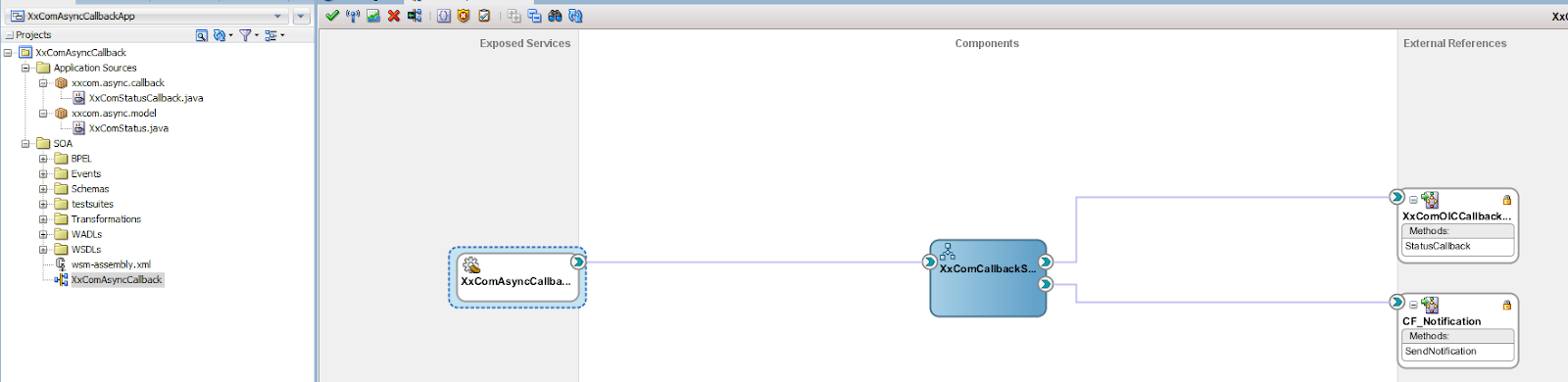
        Sample Composite:


        Reference : https://technology.amis.nl/it/publish-soa-composite-application-as-ejb-to-be-invoked-from-java-applications-using-ejb-binding/

        Friday, 1 July 2022

        SOACS Maven Deployment

        Maven Setup:
        First we need to download and install Maven. 
        • Download maven from this site - https://maven.apache.org/download.cgi
        • Unzip the downloaded file. 
        • Add MAVEN_HOME system variable / Environment Variable
          • MAVEN_HOME = C:\Vijaya\SW\Maven\apache-maven-3.8.6
        • Add Maven bin folder to PATH variable. 
          • PATH = C:\Vijaya\SW\Maven\apache-maven-3.8.6/bin
        • Run mvn --version to check the setup
        Update local repository: 
        We need to set up a local maven repository for deploying applications using maven. 
        First we need to install SOACS on our local machine. Download the SOA installer jars from Oracle and install it on a local machine. 

        Update Local Repository with SOA plugins:  Follow the below steps to configure a local repository with SOA plugins. 

        • Go to the following Oracle installation path . 
                cd C:\Oracle\Middleware\Oracle_Home\oracle_common\plugins\maven\com\oracle\maven\oracle-maven-sync\12.2.1
        • Execute the following maven commands. 
        mvn install:install-file -Dfile=oracle-maven-sync-12.2.1.jar -DpomFile=oracle-maven-sync-12.2.1.pom

        mvn com.oracle.maven:oracle-maven-sync:push -DoracleHome=C:/Oracle/Middleware/Oracle_Home -DoverwriteParent=true

        mvn com.oracle.maven:oracle-maven-sync:push -Doracle-maven-sync.oracleHome=C:/Oracle/Middleware/Oracle_Home

        mvn com.oracle.maven:oracle-maven-sync:push -Doracle-maven-sync.oracleHome=C:/Oracle/Middleware/Oracle_Home -Doracle-maven-sync.testonly='true'

        mvn archetype:crawl -Dcatalog=C:\Users\vijaya\.m2\archetype-catalog.xml 


        Create a Maven SOA Project and update the POM files.

        Use the following POM files as a template.

        Application POM:

        <project xmlns:xsi="http://www.w3.org/2001/XMLSchema-instance" xmlns="http://maven.apache.org/POM/4.0.0" xsi:schemalocation="http://maven.apache.org/POM/4.0.0 http://maven.apache.org/xsd/maven-4.0.0.xsd">
          <modelversion>4.0.0</modelversion>
          <groupid>SampleApplicationSOA</groupid>
          <artifactid>SampleApplicationSOA</artifactid>
          <version>1.0</version>
          <packaging>pom</packaging>
          <modules>
            <!--Add project modules-->
            <module>SampleProject1</module>
            <module>SampleProject2</module>
          </modules>
        </project>

        Project POM:

        <?xml version="1.0" encoding="UTF-8" ?>
        <project xsi:schemaLocation="http://maven.apache.org/POM/4.0.0 http://maven.apache.org/xsd/maven-4.0.0.xsd"
                 xmlns="http://maven.apache.org/POM/4.0.0" xmlns:xsi="http://www.w3.org/2001/XMLSchema-instance">
          <modelVersion>4.0.0</modelVersion>
          <groupId>SampleProject1</groupId>
          <artifactId>SampleProject1</artifactId>
          <version>1.0</version>
          <packaging>sar</packaging>
          <parent>
            <groupId>com.oracle.soa</groupId>
            <artifactId>sar-common</artifactId>
            <version>12.2.1-3-0</version>
            <relativePath></relativePath>
          </parent>
          <properties>
            <!-- These parameters are used by the compile goal -->    
            <scac.input.dir>${project.basedir}/SOA/</scac.input.dir>
            <scac.output.dir>${project.basedir}/target</scac.output.dir>
            <scac.input>${scac.input.dir}/composite.xml</scac.input>
            <scac.output>${scac.output.dir}/out.xml</scac.output>
            <scac.error>${scac.output.dir}/error.txt</scac.error>
            <scac.displayLevel>1</scac.displayLevel>
            <composite.name>${project.artifactId}</composite.name>
            <composite.revision>1.0</composite.revision>
            <composite.partition>default</composite.partition>
            <overwrite>true</overwrite>
            <forceDefault>true</forceDefault>
            <regenerateRulebase>false</regenerateRulebase>
            <keepInstancesOnRedeploy>false</keepInstancesOnRedeploy>
            <scatest.result>${scac.output.dir}/testResult</scatest.result>
            <input>${project.artifactId}</input>
          </properties>
          <build>
            <plugins>
            <!-- Plugin to read the propery file</file>-->
            <plugin>
                <groupId>org.codehaus.mojo</groupId>
                <artifactId>properties-maven-plugin</artifactId>
                <version>1.0-alpha-2</version>
                <executions>
                  <execution>
                    <phase>initialize</phase>
                    <goals>
                      <goal>read-project-properties</goal>
                    </goals>
                    <configuration>
                      <files>
                        <file>${build.properties.file}</file>
                      </files>
                    </configuration>
                  </execution>
                </executions>
              </plugin>
             <!-- Plugin to replace the tokens </file>-->
               <plugin>
                <groupId>com.google.code.maven-replacer-plugin</groupId>
                <artifactId>replacer</artifactId>
                <version>1.5.3</version>
                <executions>
                  <execution>
                    <id>replace-schema-file</id>
                    <phase>prepare-package</phase>
                    <goals>
                      <goal>replace</goal>
                    </goals>
                    <configuration>            
        <file> ${scac.input.dir}/wsm-assembly.xml</file>              
                      <replacements>
                        <replacement>
                          <token>@@TARGET_SERVER1@@</token>
                          <value>${TARGET_SERVER1}</value>
                        </replacement>
                        <replacement>
                          <token>@@TARGET_SERVER2@@</token>
                          <value>${TARGET_SERVER2}</value>
                        </replacement>
                      </replacements>
                    </configuration>
                  </execution>
                </executions>
              </plugin>
              <plugin>
                <groupId>com.oracle.soa.plugin</groupId>
                <artifactId>oracle-soa-plugin</artifactId>
                <version>12.2.1-3-0</version>
                <configuration>
                  <compositeName>${project.artifactId}</compositeName>
                  <composite>${scac.input}</composite>
                  <sarLocation>${scac.output.dir}/sca_${project.artifactId}_rev${project.version}.jar</sarLocation>
                  <serverUrl>${SOACS_HOST_NAME}</serverUrl>
                  <user>${SOACS_USER_NAME}</user>
                  <password>${SOACS_PASSWORD}</password>
                  <!-- Note: compositeRevision is needed to package, revision is needed to undeploy -->
                  <compositeRevision>${composite.revision}</compositeRevision>
                  <revision>${composite.revision}</revision>
                  <scacInputDir>${scac.input.dir}</scacInputDir>
                  <appHome>${project.basedir}/..</appHome>
                  <oracleHome>${ORACLE_HOME}/soa</oracleHome>
                  <input>${input}</input>
                </configuration>
                <extensions>true</extensions>
              </plugin>
            </plugins>
          </build>
        <!-- To download the plugins from Oracle maven repo </file>-->
          <repositories>
            <repository>
              <name>OracleMaven</name>
              <id>maven.oracle.com</id>
              <url>https://maven.oracle.com</url>
            </repository>
          </repositories>
          <pluginRepositories>
            <pluginRepository>
              <name>OracleMaven</name>
              <id>maven.oracle.com</id>
              <url>https://maven.oracle.com</url>
            </pluginRepository>
          </pluginRepositories>
        </project>


        Note:  If we are using MDS resources (wsdl/xsd) then we need to provide the local mds path details for compilation and packaging. 

        Use the following adf-config.xml file 

        <?xml version="1.0" encoding="windows-1252" ?>
        <adf-config xmlns="http://xmlns.oracle.com/adf/config" xmlns:adf="http://xmlns.oracle.com/adf/config/properties"
                    xmlns:sec="http://xmlns.oracle.com/adf/security/config">
          <adf:adf-properties-child xmlns="http://xmlns.oracle.com/adf/config/properties">
            <adf-property name="adfAppUID" value="XxScmSDTLightAppSOA-8435"/>
          </adf:adf-properties-child>
          <sec:adf-security-child xmlns="http://xmlns.oracle.com/adf/security/config">
            <CredentialStoreContext credentialStoreClass="oracle.adf.share.security.providers.jps.CSFCredentialStore"
                                    credentialStoreLocation="../../src/META-INF/jps-config.xml"/>
          </sec:adf-security-child>
          <adf-mds-config xmlns="http://xmlns.oracle.com/adf/mds/config">
            <mds-config xmlns="http://xmlns.oracle.com/mds/config">
              <persistence-config>
                <metadata-namespaces>
                  <namespace path="/apps" metadata-store-usage="mstore-usage_2"/>
                  <namespace path="/soa/shared" metadata-store-usage="mstore-usage_3"/>
                </metadata-namespaces>
                <metadata-store-usages>
                  <metadata-store-usage id="mstore-usage_2">
                    <metadata-store class-name="oracle.mds.persistence.stores.file.FileMetadataStore">
                      <property name="metadata-path" value="${soamds.apps.home}"/>
                    </metadata-store>
                  </metadata-store-usage>
                  <metadata-store-usage id="mstore-usage_3">
                    <metadata-store class-name="oracle.mds.persistence.stores.file.FileMetadataStore">
                      <property name="partition-name" value="seed"/>
                      <property name="metadata-path" value="${soa.oracle.home}/integration"/>
                    </metadata-store>
                  </metadata-store-usage>
                </metadata-store-usages>
              </persistence-config>
            </mds-config>
          </adf-mds-config>
        </adf-config>

        ${soamds.apps.home} :  Pass local MDS path while running Maven command.
        ${soa.oracle.home} :   Pass either local MDS or SOA install directory path where seeded resources are present. 


        Maven Command to Deploy:

        mds_path=$(pwd)/soamp/mds

        MIDDLEWARE_HOME_SOA= C:\Oracle\Middleware\Oracle_Home\  (SOA installation path)

        mvn -Dbuild.properties.file=${property} -Dsoa.oracle.home=${MIDDLEWARE_HOME_SOA}/soa -Dsoamds.apps.home=${mds_path} pre-integration-test


        In case if we have to use an SSL port for the deployment and if we need to use a custom trust store to connect then we can use the following maven command. 

        mvn -Dbuild.properties.file=${property} -Dsoa.oracle.home=${MIDDLEWARE_HOME_SOA}/soa -Dsoamds.apps.home=${mds_path}  -Djavax.net.ssl.keyStoreType=JKS -Djavax.net.ssl.trustStore=${trustStoreFile} -Djavax.net.ssl.trustStorePassword=**** -Djavax.net.ssl.keyStore=${trustStoreFile} -Djavax.net.ssl.keyStorePassword=*** pre-integration-test


        Wednesday, 8 July 2020

        SOACS - SSL Configuration


        Creating KSS keystores and generating Certificate Signing Request (CSR)

        • Login to em console and open Weblogic domain -> Security -> Keystores page.
        • Create a new stripe, or use an existing one (eg. "system")
        • Under selected stripe, create a new keystore myKSSIdentity, password based, for custom identity
        • Under selected stripe, create a new keystore myKSSTrust, password based, for custom trust.
        • Open manage section of myKSSIdentity, create a new key pair inside myKSSIdentity with alias as myKSSIdentity and password as required.
        • Use the below values while creating keypair:
          • Alias Name: myIdentity
          • Common Name: mysoacsdomain.com (domain name registered with public DNS)
          • The rest of information from keypair generation form is optional.
        • Select the new keypair created and click generate CSR.
        • Export the created CSR, share it with CA, and get root, intermediate and signed certificates.

        Importing CA Certificates

        • Login to em console and open weblogic domain -> security -> keystores page.
        • Select the identity keystore (myKSSIdentity) and click manage
        • Import root certificate from CA as trusted certificate (alias myRootCA).
        • Import intermediate certificate from CA as trusted certificate (alias myInterCA).
        • Import signed certificate as certificate and select alias as myIdentity from drop down. This should be same alias that used to create keypair for generating CSR.
        • Select the trust keystore (myKSSTrust) keystore and click manage.
        • Import root certificate from CA as trusted certificate (alias myRootCA).
        • Import intermediate certificate from CA as trusted certificate (alias myInterCA).
        • Import signed certificate as trusted certificate (alias mySignedCert).
        •  Using putty, login to soa CS VM and open /u01/jdk/jre/lib/security
        •  Import the intermediate certificate into cacerts using below command:  
          • keytool -import -keystore cacerts -storepass changeit -file inter.crt
        •  Take a backup from cacerts file, for future use (eg. in case of JDK upgrade).

        Sync Key Stores


        • Login to SOA CS VM using putty.
        • Open /u01/oracle/middleware/oracle_common/common/bin
        • Run ./wlst.sh and execute below commands to sync custom identity and custom trust keystores.

        connect('weblogic',’****,'t3://x.x.x.93:7001')
        svc = getOpssService(name='KeyStoreService')
        svc. listKeyStoreAliases (appStripe="system”, name="myKSSIdentity”, password=” ****”, type="*")
        syncKeyStores(appStripe='system',keystoreFormat='KSS')
        svc. listKeyStoreAliases (appStripe="system”, name="myKSSTrust”, password='****’, type="*")
        syncKeyStores(appStripe='system',keystoreFormat='KSS')
         
        • Restart both admin and managed servers.
        Note: This step is needed only if using "system" stripe.

        Change weblogic keystores to Custom Identity and Custom Trust

        • On weblogic server admin console open Servers -> Admin Server -> Keystores tab:
        • Change the keystore to Custom Identity and Custom Trust
        • Save
        • Provide the values for Custom Identity
          • Custom Identity Keystore: kss://system/myKSSIdentity and Press ENTER.
          • Custom Identity KeyStore Type:  KSS and ENTER
          • Custom Identity PassPhrase: enter password given while creating myKSSIdentity keystore
          • Confirm Custom Identity PassPhrase:
          • enter password given while creating myKSSIdentity   keystore
        • Provide the values for Custom Trust
          • Custom Trust Keystore: kss://system/myKSSTrust and Press ENTER.
          •  Custom Trust KeyStore Type: KSS and ENTER
          •  Custom Trust PassPhrase: enter password given while creating myKSSTrust keystore
          •  Confirm Custom Trust PassPhrase: 
          • enter password given while creating myKSSTrust  keystore
        • Click Save
        • Open SSL tab
          •  Provide Private Key Alias: myIdentity and Press ENTER.
          •  > This is the alias given while create keypair in myIdentitykeystore
          •   Private Key PassPhrase: Password given while creating key pair under idenity keystore
          •  Confirm Private Key PassPhrase:
          •  Password given while creating key pair under idenity keystore
        • Change HostNameVerfication = None. Not sure if its required.
        • Click Save.
        • Repeat steps 1 to 8 for Managed Server also.
        • Stop Admin, Managed Server and Node Manager.

        Node Manager Changes

        1. Open /domain_home/nodemanager
        2. Edit nodemanager.properties and add the below properties.

        # added for custom identity and custom trust
        KeyStores=CustomIdentityAndCustomTrust
        CustomIdentityAlias=myKSSIdentity
        CustomIdentityKeyStoreFileName=kss://system/myKSSIdentity
        CustomIdentityKeyStorePassPhrase=*********
        CustomIdentityKeyStoreType=KSS
        CustomIdentityPrivateKeyPassPhrase=*********
        CustomTrustKeyStoreFileName=kss://system/myKSSTrust

        3. Edit startNodeManager.sh file under /domain_home/bin to add the below properties during startup: 

        JAVA_OPTIONS="${JAVA_OPTIONS} -Doracle.security.jps.config=/u01/data/domains/SOA_domain/config/fmwconfig/jps-config-jse.xml -Dcommon.components.home=/u01/app/oracle/middleware/oracle_common -Dopss.version=12.2.1.2 -Dweblogic.nodemanager.sslHostNameVerificationEnabled=false -Djava.security.egd=file:/dev/./urandom.egd=file:/dev/./urandom"

        Note: -Dopss.version=12.2.1.2 property is specific to version 12.2.1.2.

        Changes in boot.properties

        Note: This step is not needed if the environment is using OTD.

        1. Login the SOA CS VM through putty and open /domain_home/servers/AdminServer/data/nodemanager
        2. Take a backup copy of boot.properties.
        3. Open boot.properties and comment the below line and save.

        #TrustKeyStore=DemoTrust

        4. Open /domain_home/servers/soa_server1/data/nodemanager/
        5. Take a backup copy of boot.properties.
        6. Edit boot.properties file, comment the below line.

        #TrustKeyStore=DemoTrust

        7. Add the below lines at the end.

        CustomTrustKeyStoreFileName=kss://system/myKSSTrust
        TrustKeyStore=CustomTrust
        CustomTrustKeyStorePassPhrase=****
        CustomTrustKeyStoreType=KSS

        8. save boot.properties.


        In setDomainEnv.sh remove this property:

        -Djavax.net.ssl.trustStore=%WL_HOME%\server\lib\DemoTrust.jks

        Wednesday, 13 May 2020

        OWSM - Basic Understandings

        • Oracle provides a security framework called Oracle Web Service Manager to secure the services across your organization. 
          • We can use OWSM policies to secure 
            • ADF Services.
            • Web Services.
            • RESTFull Services.    
        We can apply default policies globally using EM console. 
        • Domain
        • Web Services
        • Web Service Policy Set
          • Here you can create a custom policy set based on the Subject. 
            • Example Subjects
              • RESTful Resource
              • RESTful Client
              • ADF SOAP Webservice Connection
              • ESS SOAP Job Invoker
              • SOA SOAP Service
              • SOA SOAP Reference
              • SOA RESTful Reference
              • Etc.
          • Add the existing OWSM policy to the policy set 
          • Enable the policy set. 
        We can add default values for the OWSM policies using EM console.
        • Domain
        • Web Services
        • WSM Policies
          • Search for the policy
          • Select Open 
            •  Select Settings 
            • Add the default values. 

        • Before we use OWSM policies , we need to install OWSM on weblogic server. 
        • OWSM provides Client and Service policies to protect and invoke your secured services. 
        • Service policies are used to secure your exposed services. 
        • Client policies are used to invoke the secured services. 
        • Some of the basic authentication policies are
          • Policy - 1

                                     oracle/http_basic_auth_over_ssl_service_policy
                                     oracle/http_basic_auth_over_ssl_client_policy

                                  This is an authentication only policy for both SOAP and REST service. 

          • Policy -2 

                                      oracle/wss_http_token_client_policy
                                      oracle/wss_http_token_service_policy

                                 This is an authentication only policy for SOAP. It  support transport  authentication. 

          • Policy -3
                                   oracle/wss_username_token_client_policy
                                    oracle/wss_username_token_service_policy

                                  This is an authentication only policy for SOAP. It  support SOAP authentication. 

          • Policy -4 
                                       oracle/wss_http_token_over_ssl_client_policy
                                       oracle/wss_http_token_over_ssl_service_policy

                              This policy is used authentication as well as message protection . It support transport  authentication.  This will use SSL protection.  Communication happens via HTTPS  port.

          • Policy -5
                                     oracle/wss_username_token_over_ssl_client_policy
                                     oracle/wss_username_token_over_ssl_service_policy
         
                                 This policy is used authentication as well as message protection . It support SOAP     level authentication.  This will use SSL protection.  Communication happens via HTTPS  port.

        • Oracle provide SAML authentication policies for web service.  
        • For more details on other policies refer following oracle link. -  Custom-OWSM


        Note: 

            If your application is not configured with OWSM then you can use basic authentication to access the services protected using OWSM policies. 

        Example : 

              Python :
                             
                           creadentials = base64.encodestring('%s:%s' % (username, password))[:-1]
                           authorization = "Basic %s" % creadentials

             .NET :

                      request.Method = "POST";
                     request.ContentType = "text/xml;charset=UTF-8";
                     request.ContentLength = byteArray.Length;
                     request.Headers.Add("Authorization", "Basic " + credentials);


        Thursday, 24 October 2019

        SOA Java Snippet to Decode and Encode


        Decode: 

        XMLElement EncodedData = (XMLElement)getVariableData("VariableName","VariablePart","PathOfTheElementHoldingData");         
        String EncodedReportData=EncodedData.getTextContent();                         
        oracle.soa.common.util.Base64Decoder B64Decoder = new oracle.soa.common.util.Base64Decoder();                                         
          try                                         
           {                                         
              String DecodedReportData = B64Decoder.decode(EncodedReportData);         
              setVariableData("DecodedString",DecodedReportData);                                           
           }                           
          catch(Exception e)                                             
           {                                         
              addAuditTrailEntry("Exception During Decode "+e.getMessage());       
              e.printStackTrace();                                         
           }


        Encode: 

        XMLElement DecodedData = (XMLElement)getVariableData("VariableName","VariablePart","PathOfTheElementHoldingData");          
        String DecodedReportData=DecodedData.getTextContent();                          
        oracle.soa.common.util.Base64Decoder B64Decoder = new oracle.soa.common.util.Base64Decoder();                                          
          try                                          
           {                                          
              String EncodedReportData = B64Encoder.encode(DecodedReportData);          
              setVariableData("EncodedString",EncodedReportData);                                            
           }                            
          catch(Exception e)                                              
           {                                          
              addAuditTrailEntry("Exception During Encode "+e.getMessage());        
              e.printStackTrace();                                          
           }

        Monday, 9 September 2019

        BPEL Custom Invoke Properties

        <bpelx:toProperties>
        <bpelx:toProperty name="jca.jndi"
         variable="Dynamic_JNDI"/>
        </bpelx:toProperties>


        <bpelx:toProperties>
                    <bpelx:toProperty name="csf-key" variable="inputVariable(Variable holding the key value)" part="payload">
                      <bpelx:query>ns:ParametersList/ns:Parameters[ns:ParameterName='KEY_NAME']/ns:ParameterValue</bpelx:query>
                    </bpelx:toProperty>
                  </bpelx:toProperties>


                <bpelx:fromProperties>
                  <!--<bpelx:fromProperty name="Authorization" variable="authTokenVar"/>-->
                  <bpelx:fromProperty name="x-intg-source-system" variable="sourceSystemUserVar"/>
                </bpelx:fromProperties>

        Friday, 23 August 2019

        SOACS Instance Auto Purge Configuration.


        • Go to SOA-INFRA -> SOA Administration -> Auto Purge
        • Auto Purge Job Name -SOA Flow Purge Job 1 and Enable it. 
        • Provide Job Schedule details as per below .
          • Run every Day at Midnight
            • FREQ=DAILY; BYHOUR=00;
          • Run every weekday at midnight
            • FREQ=DAILY; BYDAY=MON,TUE,WED,THU,FRI; BYHOUR=00;
          • Run every weekend at midnight and 05:00AM
            • FREQ=DAILY; BYDAY=SAT,SUN; BYHOUR=00,05;
          • Run every weekday 30 minutes past midnight
            • FREQ=DAILY; BYDAY=MON,TUE,WED,THU,FRI; BYHOUR=00; BYMINUTE=30;
          • Run every weekend 30 minutes past midnight and 5AM
            • FREQ=DAILY; BYDAY=SAT,SUN; BYHOUR=00,05; BYMINUTE=30;
          • Run every friday at midnight
            • FREQ=DAILY; BYDAY=FRI; BYHOUR=0;
        • Purge Type -> Single
        • Retain Data ->  7 or 30 days. 
        • Batch Size 

        Oracle Fusion - Order Management Cross Reference

        Summary:  This guide outlines the steps to manage cross-reference data for Sales Order FBDI upload for the source systems,  including export...